

You read many hardware-related issues and solutions on CoreNetworkZ. Today we are discussing the reasons for an unexpected automatic restarting of a computer.
Once I faced this problem, where my computer rebooted automatically without providing any warning, and I lost every unsaved work.
I took one week to troubleshoot and fix the problem. This guide is the result of my one-week troubleshooting experience.
Automatic restarting is one of the most frustrating computer-related problems you can experience.
I believe having a guide for those who face the same problem can be very helpful in identifying the reasons for the automatic restarting of their systems.
If you can identify why your PC is rebooting suddenly without warning, you will be able to solve it. At first, we check common reasons for the issue.
Some of them are software conflicts, hardware issues, and virus infections.
Let us check carefully why a Laptop restarts without giving a warning.
Let us check how to troubleshoot an automatic rebooting laptop or PC. I have created this guide based on my troubleshooting experience with my device.
Now we will check how to fix the automatic computer rebooting without warning due to software conflicts, malware infections, and hardware issues.
We divide this part into three. The first part explains how to resolve frequent rebooting problems due to incompatible Apps installed. The second part deals with removing malware infections to prevent your computer from an unexpected restart.
The third part explains how faulty hardware invites automatic restart problems.
If you are desperately looking for a quick fix to the automatic rebooting issue, you can tell your computer to don't restart automatically for any system error.
By default, Windows trigger an automatic system reboot on every system failure.
This option prevents further damage to your device. But it will trigger automatic rebooting for petty issues.
If you want to disable automatic system reboot on system failure set on your computer, you can disable it under Startup and Recovery. You will see a checkbox to stop Automatic Reboot on the Startup and Recovery settings window.
For Windows XP
PS: It is not a good practice to keep the checkbox Automatically restart unchecked without fixing the exact reasons for the system failure.
Once I faced this problem, where my computer rebooted automatically without providing any warning, and I lost every unsaved work.
I took one week to troubleshoot and fix the problem. This guide is the result of my one-week troubleshooting experience.
Automatic restarting is one of the most frustrating computer-related problems you can experience.
I believe having a guide for those who face the same problem can be very helpful in identifying the reasons for the automatic restarting of their systems.
If you can identify why your PC is rebooting suddenly without warning, you will be able to solve it. At first, we check common reasons for the issue.
Some of them are software conflicts, hardware issues, and virus infections.
Let us check carefully why a Laptop restarts without giving a warning.
Reasons for Unexpected Automatic Reboot of Your Computer
- Software Conflicts
- Outdated Driver
- Recently Installed Incompatible Software
- Failed Windows Update
- Outdated Driver
- Malware Infection
- Hardware Issues
- Overheat
- Corrupted System Memory
- Dust Particles in Your System Cabinet
- Problems with the Power Supply
- Possible Loose Connections
- Overheat
Let us check how to troubleshoot an automatic rebooting laptop or PC. I have created this guide based on my troubleshooting experience with my device.
How to Fix Automatic Restarting Problem on a Laptop & Desktop PC?
Now we will check how to fix the automatic computer rebooting without warning due to software conflicts, malware infections, and hardware issues.
We divide this part into three. The first part explains how to resolve frequent rebooting problems due to incompatible Apps installed. The second part deals with removing malware infections to prevent your computer from an unexpected restart.
The third part explains how faulty hardware invites automatic restart problems.
-
Fix Frequent Computer Restarting Due to Software Conflicts
Let us check how to fix software conflicts that cause computer reboots frequently without warning.
- System Restore
If your computer restarts automatically due to software conflicts, the first solution is to choose Last Known Good Configuration using the Windows System Restore.
- Open Windows Search
You can open Windows Search by pressing Windows and S keys together.
- Type Recovery in the Search box.

Click the Open.
- Click Open System Restore.

- Restore System Files and Settings.

Click the Next button.
- Select a Restore Point
Choose a Restore point before your computer starts showing problems.

Click Next to Continue the process.
Avoid the recently installed software and update the driver as soon as possible.
If the issue persists, I suggest you go for the next solution.
- Open Windows Search
- Check for Possible Windows Update Error
This issue is limited to Windows machines(not applicable to Linux computers). Windows 11 and Windows 10 laptops need to reboot after downloading updates.
A failed Windows 11 update (or Windows 10 update) will cause a computer reboots automatically in an attempt to fix the problem.
An interrupted Windows update can invoke a loop of computer rebooting. Make sure your device has the latest Windows update.
- Open Windows Search.
- Type Windows Update in the Search box. Open Windows Update Settings.

- Tap on the Download to complete the Windows Update.
- Open Windows Search.
- System Restore
Computer Reboots Frequently Due to Malware Infections
If your device restarts automatically without warning, even after uninstalling the recently installed software, you must check for possible Virus Infections.
Install a reputed AntiVirus application on your laptop and update the virus definition.
Perform a full system scan to detect and remove all malware infections. It will resolve unexpected computer restarting due to Virus infections. If the issue persists, you must check for hardware problems.
Resolve Faulty Hardware Issues Prompting Automatic System Reboot
If there are no software compatibility and malware issues, check for possible hardware issues.
To check Hardware issues, I assume you have a decent knowledge of computer hardware troubleshooting. You may require to open the system cabinet and inspect each component.
If you do not have enough knowledge, I recommend you seek a qualified computer professional.
Here is a list of potential hardware problems that can make your PC restart automatically.
- Heat-related Issues
Brand-new Laptops and PCs will shut down or restart automatically if the processor heat exceeds a certain level. Make sure your laptop does not have heat-related issues to avoid this situation.
Visit the link below to learn how to protect your computer from overheating.
Protect Your Laptop From Overheating
- Corrupted System Memory
Corrupted RAM modules will trigger an automatic system reboot. To verify it, remove the current RAM and start your PC with another piece of RAM module.
- Dust Particles in The System Cabinet
The presence of dust particles in the CPU may trigger an automatic system restart. It is a good practice to clean the system cabinet to make your PC free from dust particles.
- Test Power Supply
A faulty power supply to your PC will force it to shut down or reboot automatically without warning.
Test the power supply. If you find any issues, replace the Power Supply Unit immediately.
- Possible Loose Connections
Disconnect the hard disk and DVD drive from the motherboard and reconnect to avoid any loose connection.
- Heat-related Issues
Optimize Blogger Template To Rank High
View Saved Passwords From Google Chrome
How to Cascade Teo Routers in My LAN?
Fix Acer Aspire Laptop Freezing Issue
View Saved Passwords From Google Chrome
How to Cascade Teo Routers in My LAN?
Fix Acer Aspire Laptop Freezing Issue
Quick Fix to Automatic System Reboot Issue
If you are desperately looking for a quick fix to the automatic rebooting issue, you can tell your computer to don't restart automatically for any system error.
By default, Windows trigger an automatic system reboot on every system failure.
This option prevents further damage to your device. But it will trigger automatic rebooting for petty issues.
If you want to disable automatic system reboot on system failure set on your computer, you can disable it under Startup and Recovery. You will see a checkbox to stop Automatic Reboot on the Startup and Recovery settings window.
- Click Windows Start.
- Right Click the Computer in the Start menu and click Properties.

- Click Advanced System Settings.
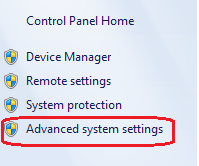
- Click the Settings button under Startup and Recovery.

- Uncheck the Checkbox near Automatically restart.

How to Bypass Forgotten BIOS Password?
All AMI & AWARD BIOS Backdoor Passwords
I Cannot Boot My Computer in Safe Mode
Using Flash Memory (USB) as Virtual RAM
All AMI & AWARD BIOS Backdoor Passwords
I Cannot Boot My Computer in Safe Mode
Using Flash Memory (USB) as Virtual RAM
For Windows XP
- Right-click on the My Computer icon.
- Click the Properties.
- Click on the Advanced tab.
- Click on the Settings button under Startup and Recovery.
- In the Startup and Recovery window, uncheck the Automatically restart check box.
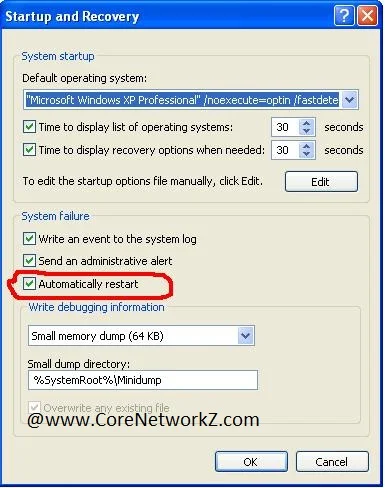
Click OK.
PS: It is not a good practice to keep the checkbox Automatically restart unchecked without fixing the exact reasons for the system failure.
