

Yesterday I faced a strange issue while trying to access the Internet and I failed to go online. There was no connection to the wireless network and I started troubleshooting the issue. When I type ipconfig on command prompt as the first step in every network troubleshooting, I received the IP address 0.0.0.0 instead of a valid IP address. I tried to renew the IP address by typing ipconfig/renew but failed with the following error message...
"No operation can be performed on Local Area Connection while it has media disconnected. An error occurred while renewing interface wireless network connection. The RPC server is unavailable ".
So the process was like this
1. Check the IP address on command prompt by typing ipconfig
Result. IP address ----> 0.0.0.0
2. Renew the IP address by ipconfig/renew
Got the error message which says RPC server is unavailable.
The reason for this error message "The RPC server is unavailable is the Remote Procedure Call server can't be located. It means the server service is not yet started and to fix the error we need to start the RPC server.
Steps to start RPC server
The steps to start the Remote Procedure Call server are:
1. Click on start and go to the Run window
2. On Run type services.msc
Now the services window will be opened.
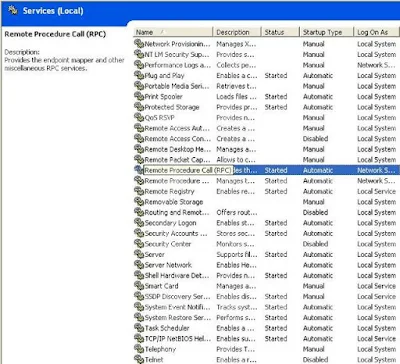
3. Start Remote Procedure Call service
We do it by right click on the service and click on start.
4. After starting the RPC server service we need to restart the computer. After restarting the computer the issue will be fixed.
Update
If the issue persists, you should perform a system restore and check for the issue.
PS: Recommended by a reader (Farhan)
To read more about RPC server and RPC authentication, follow the link below.
What is RPC (Remote Procedure Call ) and RPC Authentications
New Topics
"No operation can be performed on Local Area Connection while it has media disconnected. An error occurred while renewing interface wireless network connection. The RPC server is unavailable ".
So the process was like this
1. Check the IP address on command prompt by typing ipconfig
Result. IP address ----> 0.0.0.0
2. Renew the IP address by ipconfig/renew
Got the error message which says RPC server is unavailable.
The steps to fix the issue RPC server is unavailable
The reason for this error message "The RPC server is unavailable is the Remote Procedure Call server can't be located. It means the server service is not yet started and to fix the error we need to start the RPC server.
Steps to start RPC server
The steps to start the Remote Procedure Call server are:
1. Click on start and go to the Run window
2. On Run type services.msc
Now the services window will be opened.
3. Start Remote Procedure Call service
We do it by right click on the service and click on start.
4. After starting the RPC server service we need to restart the computer. After restarting the computer the issue will be fixed.
Update
If the issue persists, you should perform a system restore and check for the issue.
PS: Recommended by a reader (Farhan)
To read more about RPC server and RPC authentication, follow the link below.
What is RPC (Remote Procedure Call ) and RPC Authentications
New Topics
