

Bing is a popular search engine from Microsoft and is an alternative to Google. Bing helps get search results that are not available on Google.
But a few categories are blocked in Bing search by default.
This tutorial explains how to search restricted content on Microsoft Bing.
Microsoft Bing Search Engine blocks certain content by default which is not family-friendly. You can disable this restriction if you are not happy with it.
Once you disable the Bing Safe Search feature, you will face no issues accessing any content through Bing Search Engine.
So, how can you disable the Bing Safe Search feature?
This tutorial explains how to disable the SafeSearch feature on Bing Search Engine. Before explaining the steps to turn off Bing Safe Search, check the screenshot below.
This screenshot shows the result of a Bing search on restricted content (when the safe search feature is on).
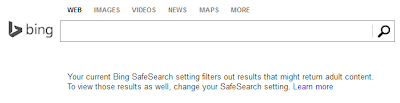
The default Bing Search Settings do not allow users to search every category. To search without restrictions, we must turn off the Safe Search feature.
Let us check how to turn off the Bing safe search feature.
How to Disable Bing SafeSearch Feature?
- Go to Settings
You can access the Bing Search settings page by visiting the link below.
- Choose Right Choice
You can select the right SafeSearch option from the list.

Here you can see three choices.
- Strict
- Moderate
- Off
- Strict
- Select the right choice and click the Save button.

If you select the Strict option in SafeSearch, Bing will no longer show unwanted content. If you want to enable parental control for results, choose the Strict.
The second option, moderate, works like the Strict option regarding the image and video search.
The moderate option is liberal on text search results.
However, only family-friendly pictures and videos will show in the moderate option.
The third option is to turn off Bing SafeSearch. This option will no longer protect you from showing unwanted results. That means you can search on Bing without any restrictions.
How to Change Free Blogspot Blog Address?
Complete Guide For Doing Router Cascading
Resolve Acer Aspire Laptop Random Freezing
How to Bypass Country-Specific Content Ban on Bing Search?
However, this approach has one limitation. A country-specific ban is still effective even though you turned off the Safe Search feature.
Each country has a share of the restricted content.
So, how can we bypass the restrictions put on by your country on Bing Search Results?
The answer is simple. Change the default country from the Bing Search Settings.
Set a Country With Liberal Policies as the Default
Another method to bypass the SafeSearch feature is to change the default country.
As we know, some countries are more strict about the content shown on Search results. Those countries implement strict content censoring, but some countries have flexible views.
So we can bypass the harsh content filtering in Bing Search by changing the default country.
The Microsoft Search Engine works with full functionality in countries like the United States of America. Most other countries have certain limitations in features or search capability. To get the maximum search feature and avoid Bing's safe search feature, we must configure it with the following settings.
- country/region: United States English
- Safe Search: Should be turned off
To enable these two conditions, follow the steps below.
- Visit the link below.
- Click the country from the menu.

You can select any liberal country from the list. If the SafeSearch feature blocks your search Result, you can turn it off from the same page.
- How to Add a Website in Microsoft Webmaster Tools
- Submit your Website Sitemap For MS bots
- I am Not Getting Traffic From Microsoft Search Engine
- Use MS Engine To Find Backlinks To My Website
Author: Alex George

Alex George is the Chief Editor and founder of CoreNetworkZ Tech Solutions. He is a senior software developer with 20 years of experience.
You can contact him at alex.george@corenetworkz.com.
Be aware that even in the good old USofA the instructions to turn off the safe search feature usually fails.
ReplyDelete