

Ping Request Timed Out is one of the common ICMP error messages one sees while pinging a destination device.
This article explains why you see a Request Timed Out reply as a response to your ping and the solution.
It is a detailed article, so we have divided it into three parts.
What is the Ping Request Timed Out Error?
What are the reasons for getting a Request Timed Out Error?
How to Solve the Ping Request Timed Out Error?
Let us answer each question in detail.
What is a Ping Request Timed Out Error?
Request Timed Out error message says your computer had been expecting a reply for some time but received none.
Your computer generates this error message.
I will explain the concept with an example. Suppose you ping www.CoreNetworkZ.com from your computer.
Your computer sends ping packets to www.CoreNetworkZ.com and waits for replies.
It does not receive replies from the www.CoreNetworkZ.com server.
So, your computer shows a Request Timed Out to inform you about it.
It is the simplest explanation for this message.
Request Timed Out means no valid replies from the destination host.
Now, we are going to the second part of the tutorial. Let us check why we get the Request Timed Out while pinging a remote address.
Possible Reasons to Get the Ping Request Timed Out Error Message
Incorrect Network Adapter or Firewall Settings on your PC.
The remote host might be down.
There might not be a route back to your computer.
The firewall installed on the destination host may be blocking your ICMP packets.
Your device did not have an Internet connection while receiving replies.
Let us check how to troubleshoot the ICMP Echo Reply Request Timed Out and how to resolve it.
How to Fix the Ping Error Request Timed Out?
- Ping Another address from your computer
You should check whether you can ping any other address from your computer. You can check it by pinging another website or Google DNS address from your computer.
Open Command Prompt.
Type ping www.corenetworkz.com and press enter key. Check for the result.
If you cannot ping other websites, the problem is with your PC.
If it fails, go to the next step in this troubleshooting guide.
- Ping the Localhost
Type cmd on Windows search (Press Windows and S keys together to open Windows 11 Search).
Open the Command Prompt. Type ping 127.0.0.1 and press the enter key.
Check whether you get a valid reply.

If you do not get proper replies from the Localhost, the network adapter settings are corrupt, or the firewall is blocking the replies.
127.0.0.1 is the Localhost IP address.
You can fix it by following the instructions below.
Open Windows 11 Search and type Command Prompt. Now, click the option Open as an Administrator.
Type ipconfig /flushdns and press the Enter key.
Type netsh winsock reset and press the Enter key.
Type netsh int ip reset and press the Enter key.
Type netsh int ipv6 reset and press the Enter key.
Type netsh int ipv4 reset and press the Enter key.
Reboot your computer.
Now, Ping a website and check whether you get replies. If not, go to the next step.
- Turn Off the Firewall and Check for the Issue
An aggressive firewall on your computer can prevent it from receiving ICMP Echo replies to your ping.
If the firewall blocks the replies, your computer will show a Request Timed Out message on the command prompt.
8.8.8.8 is the Google DNS server address.
Try to ping the Google DNS server address to check for the issue after you turn off the firewall and other security tools on your PC.
If ping 8.8.8.8 shows a request timed out message, go to the last solution.
- Power Cycle the Network
A proper power cycle can fix most of the network connectivity issues. To do this, follow the instructions below.
-
Switch off the devices on your network.
Disconnect power cables from the Modem and Router.
Disconnect the Ethernet cables from Modem, Computer, and Router.
Reconnect the power and ethernet cables.
Power on the Modem and Router after one minute.
-
In this tutorial, you have learned how to fix the Request Timed Out Ping error message. Let us consider a different scenario. Occasionally, you may see Ping Request Timed Out intermittent replies.
Why Do You Get Intermittent Request Timed Out Error?
Have a look at the ping reply given below.
Pinging 8.8.8.8 with 32 bytes of data:
Request timed out.
Reply from 8.8.8.8: bytes=32 time=132ms TTL=113
Request timed out.
Reply from 8.8.8.8: bytes=32 time=514ms TTL=113
Ping statistics for 8.8.8.8:
Packets: Sent = 4, Received = 2, Lost = 2 (50% loss),
Approximate round trip times in milli-seconds:
Minimum = 132ms, Maximum = 901ms, Average = 441ms
While pinging the Google DNS server address, I received two replies and two Request Timed Out messages. Let us check why I received two intermittent Request Timed Out messages.
A loose network connection or old network components can cause this issue. In that case, I recommend you perform a complete network power cycle to fix it.
Ping Request Timed Out Every Few Seconds
When someone faces problems with network connectivity, the first thing he has to do is ping the destination address to check the connectivity.
Ping is a network utility available in every Operating System.
When you ping a destination address, your computer sends echo requests to the destination and waits for the reply.
If there is a problem, your computer will not receive the correct ICMP reply from the destination address. Instead, you will get one of the many ICMP error messages.
PING: Transmit failed. General Failure Solution
Fix Destination Net Unreachable Error Message
TTL Expired in Transit - Reason and Solution
Request Timed Out is one of the most common ICMP error messages to a failed ping. Let us check the meaning of this ICMP Echo Reply.
You can execute the ping utility from the Command Prompt in Windows 11.
The ICMP error message Request Timed Out explains your computer waited for replies from the destination host for a reasonable amount of time but received none.
If you are unfamiliar with this ICMP Echo reply, check the screenshot below.
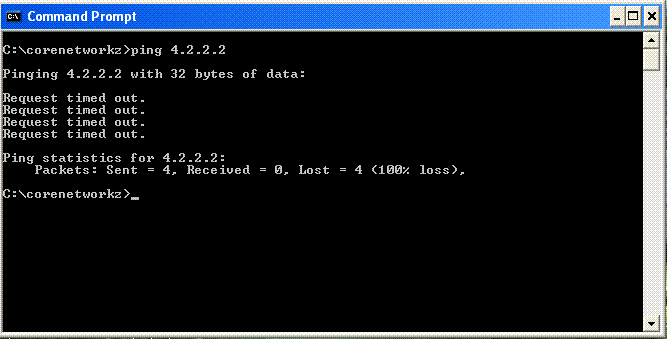
On Command Prompt, I ping the IP address 4.2.2.2, and you can see the reply I received.
Pinging 4.2.2.2 with 32 bytes of data:
Request timed out.
Request timed out.
Request timed out.
Request timed out.
Ping statistics for 4.2.2.2:
Packets: Sent = 4, Received = 0, Lost = 4 (100% loss),
C:\corenetworkz>
How to Solve Ping Request Timed Out in Windows 11?
I suggest you perform the steps mentioned in part 3 to fix the ping request timed-out message on a Windows 11 laptop.
Ping Request Timed Out Every Few Seconds in Ubuntu Linux
A complete network Power Cycle will solve this issue on a Linux laptop.
Ping Request Timed Out, But Internet Working
It is possible when your computer has an aggressive firewall configuration. An aggressive firewall is the reason for not getting a ping response. To solve it, turn off the firewall.
