


This tutorial covers key competencies required for DCAS exams, specifically focusing on Network Administration and Command-Line Configuration. Candidates are expected to know how to manage network interfaces when the Graphical User Interface (GUI) is unavailable or when managing remote servers.
No device can communicate over a network without a valid IP address. Usually, the DHCP server provides IP ( Internet Protocol ) addresses to devices connected to the network.
Sometimes we must assign a static IP address to a PC while troubleshooting the network.
We use Static IP Address to fix APIPA (Windows IP Configuration).
There are different ways to assign it to a PC, but the easiest method is the DOS method.
There is a DOS prompt command to set a static IP address on a Windows computer.
This tutorial explains how to configure a static IP address from Command Prompt and explains the procedure with a practical example.
At the end of this tutorial, you can see how to perform the same procedure on Mac.
Steps to Assign Static IP To Any Interface From Command Prompt
Start MS-DOS as Administrator
You must start the command prompt as administrator to set a static Internet Protocol number (IP) on your computer from the command prompt.
Press the Windows key and S together to open the Search box.
Type cmd on the Windows Search and right-click the Command Prompt icon.

Tap on the Run as Administrator to open Command Prompt with administrative privileges.
Set Static IP Address Command Line
DCAS questions often ask you to identify the correct syntax among four very similar-looking options. Type the following command on the DOS window.
netsh interface ip set address name="[Interface Name]" static [IP Address] [Subnet Mask] [Default Gateway]
- Press the Enter key.
It is the theoretical explanation of configuring a logical address on a laptop without the help of a DHCP server.
Now let us check a practical example to learn it.
A Practical Guide to Set Static IP From Command Line
Here I assign a Static IP Address 192.168.42.1 to my computer with default gateway 192.168.42.129 and subnet mask 255.255.255.0.
We need to find the Ethernet Adapter name ( Interface name) to execute the DOS command to set a static IP address.
So, follow the steps carefully.
Check the Current IP Address and The Interface Name
Type ipconfig on the Command Line and Press the Enter key.
You can see the IP address and the respective Ethernet adapter name (Interface name).

The Interface name is Local Area Connection 2.
Execute the Static IP Command
Type the following command on the DOS window.
netsh interface ip set address name="Local Area Connection 2" static 192.168.42.1 255.255.255.0 192.168.42.129
Press the Enter key to execute the command.
Check the Static IP Address From the Command Prompt
Type ipconfig on the Command Line and press the enter key.
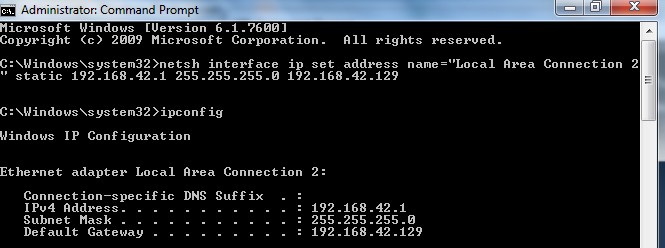
We have successfully assigned the static IP address 192.168.42.1 to this Windows 11 laptop from the Command Line.
How to Release Static IP From Command Prompt
You cannot release and renew a static IP address by using ipconfig/release.
There is another DOS Prompt command to remove the static IP address set on a computer.
netsh interface ip set address connected adapter name dhcp
Have a look at the screenshot below and find the Ethernet adapter name.
In our case, the adapter name is Local Area Connection 2.
| SN | Recent Posts |
|---|---|
| 1 | PSC Computer Science Study Materials |
| 2 | MPSC Computer Science Mock Test |
| 3 | Destination Host Unreachable Error |
| 4 | Explanation Of Power Cycling |
| 5 | WiFi Standards |
| 6 | SMART Command Failed |
So, to release the static IP address we assigned, use the following command on the DOS prompt.
netsh interface ip set address Local Area Connection 2 dhcp
For modern NYC agency environments (using Windows 10/11), DCAS may also refer to the PowerShell equivalent: New-NetIPAddress. However, netsh remains the 'legacy' standard that is frequently tested.
Reference
- https://www.nyc.gov/assets/dcas/downloads/pdf/noes/20255050000.pdf
- https://www.nyc.gov/assets/dcas/downloads/pdf/noes/20255052000.pdf
- https://www.nyc.gov/assets/dcas/downloads/pdf/noes/20255051000.pdf
Author: Alex George

Alex George is the Chief Editor and founder of CoreNetworkZ EdTech Solutions. He is a software engineer and has 20 years of experience in the EdTech niche.
He graduated with a B.Tech in Computer Science & Engineering from CUSAT and worked with three leading IT companies before starting CoreNetworkZ EdTech Solutions.
He possesses sound knowledge of SOHO Network Engineering and has completed various IT certifications, including CCNA, RHCE, and CEH.
He developed and published more than twenty professional custom themes for Blogger and is an expert in software app development.
You can contact him at alex.george@corenetworkz.com.
Just don't forget, if you mentioned GW in syntax, you should also fill in [metric] parameter!!
ReplyDelete