

If you are unhappy with the response time of your ISP's default DNS server, there is a piece of good news for you. Google announces Google Public DNS service which is free for everyone. Right now, most of the Internet users who are unsatisfied with the Domain Name System service provided by their ISP use either global or open DNS server on their computers and other devices. Now we have one more option, Google Public Domain Name System. They use easy to remember the address for their server compared to most other free services. This tutorial gives a brief explanation of this new service and tips to configure it on your computer.
For IPv4 connections, you can use the addresses below.
For your IPv6 connections, use the following addresses.
They have a tutorial for Linux users to change DNS settings on their Linux computers. To know more about it, visit the link below.
http://code.google.com/speed/public-dns/docs/using.html
Google Public DNS Server Addresses
For IPv4 connections, you can use the addresses below.
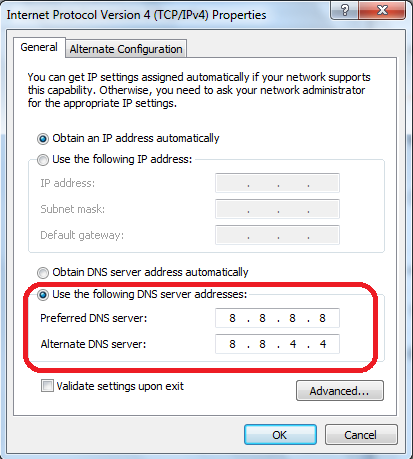
- Preferred Google DNS Server - 8.8.8.8
- Alternate Google DNS Server -8.8.4.4
For your IPv6 connections, use the following addresses.
- 2001:4860:4860::8888
- 2001:4860:4860::8844
Important Tips
- Configuration
If you do not know how to set Domain Name System server on your Windows computer, visit the link below.
Setup Domain Name System on Your PC from Command Prompt
- Support
Google has launched telephone support to assist users with issues related to their Public Domain Name System service. They assist users both from USA and outsiders. Technical support number is:
* 877-590-4367 { For US customers }
* 770-200-1201 { Outside US }
- Google DNS On Android Samsung Galaxy
If you are using Wi-Fi to connect your Android phone to the Internet, you have an option to change the DNS settings on phone. You can change the current settings on your Android phone under Wi-Fi settings (Choose Current Network -> Modify Network -> Enable Show advanced options -Enter Domain Name System details). Steps vary depends on the Android versions and customizations. However, I couldn't find a way to assign Google Public DNS to the 3G Internet on my Samsung Galaxy phone.
They have a tutorial for Linux users to change DNS settings on their Linux computers. To know more about it, visit the link below.
http://code.google.com/speed/public-dns/docs/using.html
Popular Tutorials
- How to Find Fastest Server On Your Computer
- How to Change Internet Settings On Ubuntu Linux Computer
- Getting Error While Trying to Login To Modem
- Tell Packets to Don't Fragment While in Ping Test (ping -f)
