

Yesterday I faced Internet connectivity issues on my computer, and the troubleshooting resulted in an error message PING: Transmit failed. General Failure.
I received this error when I ping the loopback address. I tried to ping a different address but received the same error.
However, I fixed the PING: Transmit failed General Failure error on my computer by following a few troubleshooting methods.
This tutorial explains the reasons to receive PING: Transmit failed General Failure error and how to solve it.
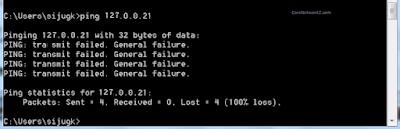
Let me show you the screenshot I took from my Windows PC before explaining the meaning of the PING: Transmit failed General Failure message.
What Does This Error Mean?
PING: transmit failed. General failure means I lost all the ping packets I sent to the loopback address.
C:\Users\sijugk>ping 127.0.0.21

Pinging 127.0.0.21 with 32 bytes of data:
PING: transmit failed. General failure.
PING: transmit failed. General failure.
PING: transmit failed. General failure.
PING: transmit failed. General failure.

Ping statistics for 127.0.0.21:
   Packets: Sent = 4, Received = 0, Lost = 4 (100% loss)
Let us check what causes the Ping Transmit failed error message.
Reasons for Getting PING: transmit failed. General failure
One of the reasons receiving PING transmit failed General failure error is the wrong TCP/IP and DNS settings. Firewall misconfiguration and Network adapter driver issues can also be reasons.
- Corrupted TCP/IP suite
- Misconfigured Firewall
- Outdated Network drivers or firmware
- DNS and other socket issues
- Other software or hardware errors
We have discussed the possible causes for the Ping Transmit failed General Failure error. Let us check how to resolve it on Windows and Linux systems.
The Solution for Ping: Transmit Failed. General Failure
Follow the instructions below to fix the PING transmit failed General failure error.
Reset the TCP/IP Suite and Flush the DNS Cache on Your Computer
The first step to troubleshoot the PING transmit failed General failure error on a Windows computer is to perform a flush DNS cache and reset TCP/IP suite.
Open Command Prompt (Press Windows and S keys together and type cmd on the search box.)
Type netsh int ip reset c:\tcp.txt on the Command Prompt and pressEnter key.
Type ipconfig /flushdns on the command prompt and press the Enter key
Reboot your computer.
Check for the issue. If you still receive the same error, proceed to the next steps.
-
Disable Firewall (and other security programs ):
Sometimes you may get this message "PING: Transmit failed. General Failure" when the firewall stops packets.
Turn Windows Defender Firewall Off. Turn Off other third-party security applications too.
Ping a website (ping CoreNetworkZ.com) and check whether the terminal shows the error again.
If so, go to the next solution.
-
Power Cycle the Entire Network:
Click this link to read about the complete procedure to power cycle your home network.
The summary of the process:
Turn off your computer, router, and modem. Wait for two minutes.
Power On the modem and wait for two minutes.
Power on the router and wait till the power LED is steady.
Switch on the computer.
Now open Command Prompt and ping a website address. Check whether it displays the PING: Transmit failed. General Failure error.
If the error message reappears, go to the next solution.
Perform a Windows Socket Reset
Execute the following commands on the Command Prompt to renew the IP address and reset Windows Socket on your laptop.
ipconfig/release
ipconfig/renew
netsh winsock reset
Perform a System Restore to the Last Known Good Configuration.
Revert your Windows 11 to the date before it started showing the PING: Transmit failed. General Failure error.
-
Update the Network Adapter driver:
Visit the link below to read more about it.
Update the modem and router (if any) firmware.
Like this guide for the "Ping: Transmit failed. General Failure" error message, we have troubleshooting guides for other important Internet connectivity error messages.
Some of them with the connection error codes are Error 718: Connection Terminatedand Error 777: Connection Attempt Failed.
How to Convert D-Link Wireless Router into Bridge Mode?
Anonymous Proxy Detected, Click Here - You Seem to be us
When I optimized the Windows 11 settings on my laptop, I faced some similar ICMP error codes. You can read more about them from the links below.
