


Published By Alex George
Welcome to the Computer Science and Technology Study Materials section from CoreNetworkZ EdTech Solutions, a leading mock test and competitive exam preparation platform, for students preparing for SSC, DSSSB, and Kerala PSC examinations. Today, I will explain a network error - Error 628.
Have you ever seen the error 628 while trying to go online? If yes, today's article is for you.
I saw this error yesterday for the first time on my Windows laptop. While trying to access the Internet, I received a message - Error 628: The Connection was Terminated by the Remote computer before it could be completed.
My computer could not go online.
Due to this error, my laptop failed to go online. This message showed two options - Redial and Cancel. You can see the screenshot below.
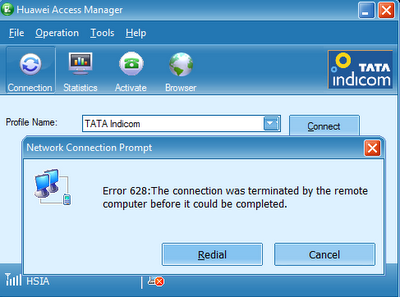
When I clicked on the redial button, the same error message appeared. To close the window, I had to click the cancel button.
I fixed it after following a set of troubleshooting steps. This article explains the steps I followed to resolve this Internet connection error.
How does This Study Material help PSC, SSC, and DSSSB Aspirants?
SSC, DSSSB, and Kerala PSC conduct examinations for various IT posts.
Understanding connection error messages is essential for candidates appearing for the DSSSB PGT/TGT Computer Science, Kerala PSC Degree Level Exam, SSC Scientific Assistant (CS), VSSC Technical Assistant, and System Analyst posts. These networking fundamentals are core parts of the Computer Science syllabus.
Kerala PSC Degree Level examinations have a Computer Science section where students can expect questions that require them to explain the reasons behind network error codes. You can check the Kerala PSC Degree Level Common Prelims Syllabus under the Computer Science section. I recommend you download the syllabus using this official link.
Reference: https://www.keralapsc.gov.in/sites/default/files/2021-02/syllubus.pdf
Reasons for Error 628
I guess it is time to update this article with answers to questions received in the comment section. Mike McPhee asked why he saw the error 628 on his Bell Canada Mobility connection. Let me answer Mike here.
CoreNetworkZ EdTech Solutions suggests the following three reasons.
Modem driver issues
Signal loss
Faulty Firewall Settings
In a mobile broadband connection, there is a chance of signal loss. This signal loss can lead to Error 628: The Connection was Terminated by the Remote computer before it could be Completed.
Wireless Signal Drops can Lead to Error 628.
Other reasons are faulty firewall settings in the user's computer and an outdated modem driver.
| Error Code | Meaning | Common Cause |
|---|---|---|
| Error 628 | Connection Terminated | Signal loss or Modem issue |
| Error 619 | Port Disconnected | Authentication settings |
| Error 691 | Access Denied | Invalid Username/Password |
The solution for Error 628: Connection was Terminated
Andrea Wofford, an independent journalist, asked for a quick solution.
She is using a USB wireless modem to access the Internet.
Now, let us check how to resolve this issue. The solution for Error 628: The Connection was Terminated by the Remote computer before it could be completed:
Check the modem Connection
The quick solution I recommend to Andrea is to disconnect the USB modem and reconnect after two minutes. However, I suggest the following order to do the troubleshooting.
Check the signal strength shown in the modem access manager.
Check whether you connected the modem correctly.
Unplug the modem and replug it after two minutes.
Varun Agarwal said in his comment that this step always fixed the error 628: : The Connection was Terminated by the Remote computer.
Check Whether the Computer has the Modem Driver
You will get this error If the PC does not have the correct modem driver. George Ferreira confirmed it in his comment. To check it, follow the steps below.
Click on start
Click on Control Panel
Go to System and Maintenance
Go to Device Manager
Check for Modem
In a comment, George Ferreira mentioned he fixed this error by installing the latest modem driver on his computer.
Update Driver
The most important solution for "Error 628: The Connection was Terminated by the Remote computer before it could be started" is to update the modem driver installed on your computer.
Make sure no applications block the connection
A study conducted by CoreNetworkZ EdTech Solutions reveals the influence of wrong firewall settings to trigger this error. If your PC has a firewall, ensure it does not block the Internet connection. You can check this issue by disabling the firewall for 10 minutes.
What do you think of today's article? I welcome your questions and feedback in the comment section.
Reference
- https://www.keralapsc.gov.in/sites/default/files/2021-02/syllubus.pdf
- https://www.cisco.com/c/en/us/td/docs/net_mgmt/media_gateway_manager/5-0/user/guide/ap_error.html
Author: Alex George
Alex George is the Chief Editor and founder of CoreNetworkZ EdTech Solutions. He is a software engineer and has 20 years of experience in the EdTech niche.
He graduated with a B.Tech in Computer Science & Engineering from CUSAT and worked with three leading IT companies before starting CoreNetworkZ EdTech Solutions.
He possesses sound knowledge of SOHO Network Engineering and has completed various IT certifications, including CCNA, RHCE, and CEH.
He developed and published more than twenty professional custom themes for Blogger and is an expert in software app development.
You can contact him at alex.george@corenetworkz.com.
You are correct, Alex. Unseating the USB modem works for me every time. As usual, a great article from you.
ReplyDeleteThank you for your comment, Varun.
DeleteHello Alex,
ReplyDeleteI am an independent journalist who uses wireless broadband most of the time due to the nature of my work. I see this 628 error often. Can you suggest a quick solution?
Hi Andrea,
DeleteWelcome to CoreNetworkZ Tech Solutions. I added a quick solution to answer your question.
Hello Alex,
ReplyDeleteI started seeing the same error code while connecting my laptop to Bell Canada Mobility. What might be the reason?
Hello Mike,
DeleteWelcome to CoreNetworkZ Tech Solutions. I answered this question in the article.
I fixed it by installing the latest release of the modem driver.
ReplyDeleteThank you for sharing your experience, George.
Delete