

Microsoft Bing is one of the most popular Search Engines nowadays. If you are a serious webmaster, you cannot avoid traffic from Bing.
To get traffic from Bing, you must inform them about your website. To inform Bing about your site, verify it with Bing Webmaster tools.
This tutorial guides you to register and verify your website with Bing.
By registering your website with Bing, you can improve its search visibility.
Requirements to Register a Website in Bing Webmaster Tools
The first step is to create a Microsoft Bing Webmaster account. You can do it with Hotmail, Gmail, and Facebook accounts.
The next step is to add and verify your domain name.
Changing the CNAME records, adding meta information, or uploading a verification file to the server can verify a website.
Let us check how to add and verify a website or blog in the Bing Search Engine webmaster tools account.
How to Verify Your Site with Bing Webmaster Tools?
Log on to Bing webmaster tools
Visit the following link.
https://www.bing.com/webmasters/about
To add your domain, Click on the Get Started button.

Sign Into Bing Webmaster Tools Account
You can sign into the Bing Webmaster Tools account with Microsoft, Google, and Facebook accounts.
Add your website and use any one of the verification methods listed.
Verify Site Ownership
After submission, you need to verify your website's ownership. Now you can see a message Site ownership has not been verified.
You can see a link Verify Now.
Click on the link.

Different Methods to Verify Your Website in Bing Webmaster Tools
You can do it in three different ways.
- Copy and paste a meta tag into your index webpage.
- Place an XML file on your web server.
- Add CNAME record to DNS.
Depending on your privileges, you can choose any one of the options available.
- Copy and paste a meta tag into your index webpage.
Benefits For Registering Your Website In Bing Webmaster Account
Out of three methods, I used meta-tag information to verify ownership because it is the simplest. If you are in a hurry, I recommend the first method.
Fix - Destination Port Unreachable Error
Delete Photos Shared On - Google Chat
Stop Visitors From ?m=1 Blogspot Page
After verifying ownership, they will give you instant access to the Bing database about your site. You can view how they treat your website by analyzing the data shown.
Display Unlimited Comments Under Blogger
Optimize Blogger Template To -- Rank High
Check Complete Backlinks to Your Blog Free
You can see how many pages are indexed by their Spiders, Clicks from search results, the number of times your website listed in Search results, crawl errors appeared, etc.
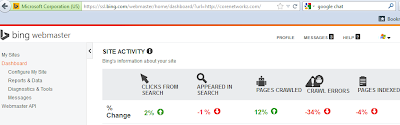
After verifying your domain name in the Bing Webmaster Tools, you will get instant access to the following information.
- Crawl issues
- Backlinks
- Outbound links
- Submit site map
- Search properties with a specific keyword
